Digital set top box

Digital set top box Parts

A digital set top box converts a cable, satellite, antenna, IPTV, or streaming signal into video and audio a television can display. Depending on the model, it may include a tuner, decoder, main board, power supply, front panel, IR receiver, HDMI port, Ethernet port, USB port, Wi-Fi antenna, storage, and remote control. When a set top box fails, the result may be no power, no signal, missing channels, a frozen menu, no remote response, weak Wi-Fi, or no HDMI output.

GenuineReplacementParts.com helps customers search for digital set top box parts by brand, model number, and part type. Exact fit matters because many boxes are built around provider-specific firmware, compact boards, and unique remote codes. A power adapter must match voltage, current, polarity, and plug shape. A remote must match the box's IR or Bluetooth command system. A front-panel board must line up with the display window, buttons, and receiver sensor.

The main board is the control center. It holds the processor, memory, decoder, and software that turn incoming signals into watchable video. The tuner or front-end section receives cable, satellite, antenna, or other input signals. The decoder processes compressed video and audio. The power supply or adapter provides safe low-voltage power. The front panel shows status and receives remote commands. Ports on the back connect the box to the TV, internet, storage, or audio system.

Customers often ask what a set top box actually does. In simple terms, it sits between the signal source and the TV. It selects channels or streams, decodes the signal, and sends picture and sound through HDMI, coaxial, AV, or network connections. If the TV works with other devices but not the set top box, the issue may be the box, cable, power adapter, remote, service authorization, or signal feed.

Troubleshooting should start outside the box. Confirm the wall outlet, power adapter, HDMI cable, TV input, network connection, and service status. Restart the box if the provider recommends it, and check whether other TVs or boxes in the home have the same issue. If every box loses channels, the problem may be signal service rather than a part. If only one box fails with a known-good adapter and cable, replacement parts become more likely.

Set Top Box Symptoms and Likely Parts

Symptom

Likely part

What to check first

No power light

Power adapter, power board, DC jack

Outlet, adapter rating, plug fit, standby light

Remote does not work

Remote, batteries, IR receiver board, front panel

Fresh batteries, line of sight, remote pairing

No signal or missing channels

Tuner, coax connector, main board, service signal

Cable connection and provider/service status

No HDMI output

HDMI port, main board, HDMI cable

TV input, alternate cable, another HDMI port

Box freezes or restarts

Power adapter, main board, storage, overheating

Ventilation, software reset, adapter stability

Weak Wi-Fi or network loss

Wi-Fi antenna, network board, Ethernet port

Router distance, Ethernet test, antenna placement

Common Parts and Functions

Part

Function

Fit or safety note

Remote control

Sends commands for power, channels, menus, and playback

Must match IR/Bluetooth code and provider model

Power adapter

Converts wall power to low-voltage input

Match voltage, polarity, current, and plug shape

Tuner module

Receives broadcast, cable, or satellite signal

Model and signal type must match

IR receiver/front panel

Receives remote signal and shows status

Panel shape, cable, and sensor placement matter

HDMI or Ethernet port

Connects box to TV or network

Often requires soldering or board replacement

Main board

Runs firmware, decoding, menus, and output

Provider firmware and exact model compatibility matter

If the box sends audio through a surround receiver, no sound may be caused by the receiver input or settings rather than the box. Compare the setup with AV receiver and amplifier parts before ordering a main board or HDMI part.

Safety guidance is straightforward for external parts and more serious for internal repairs. Replacing a remote, power adapter, or cable is usually simple if the ratings match. Opening a box with an internal power supply, damaged port, or burnt board should be handled with care. Unplug the unit before inspection. Do not use damaged adapters, frayed cords, or a power supply with a different voltage rating.

Some entertainment setups use both set top boxes and disc players through the same TV or receiver. If discs play correctly but channels do not, focus on the box. If the disc player also fails through the same path, check Blu-Ray Disc and DVD player parts and the shared connection path together.

Before ordering, gather the brand, full model number, provider model if shown, power adapter rating, remote model number, and the exact symptom. For ports and boards, compare the old board number and every connector. For external adapters, match voltage and polarity exactly. If the set top box is leased from a service provider, check replacement policies before opening it or buying internal parts.

Remote-control problems are often solved without opening the box. Check batteries, clean the battery contacts, remove objects blocking the sensor, and confirm whether the remote must be paired. If the front-panel buttons work but the remote does not, the remote or IR receiver is more likely. If neither remote nor buttons work, the front panel, firmware, or main board may be involved.

If the box includes recording storage or feeds a standalone recording device, storage failures may overlap with digital audio/video recorder parts. That is especially useful when recorded programs fail but live viewing still works.

GenuineReplacementParts.com helps shoppers find set top box parts with fit and signal path in mind. Start with the simple checks, match the exact model, and choose a part that solves the observed failure. The right remote, power adapter, tuner, board, front panel, or port can restore reliable TV viewing without replacing unrelated devices in the system.

For boxes with built-in recording features, note whether live TV works while recordings fail, or whether both fail together. Live-TV trouble points toward signal, tuner, authorization, or output issues. Recording-only trouble may involve storage, firmware, cooling, or scheduled-recording settings. That distinction makes the replacement search much sharper.

Search result

Show filters
1 - 40 out of 12 results found in 0.003s
Sorted by

A digital set top box converts a cable, satellite, antenna, IPTV, or streaming signal into video and audio a television can display. Depending on the model, it may include a tuner, decoder, main board, power supply, front panel, IR receiver, HDMI port, Ethernet port, USB port, Wi-Fi antenna, storage, and remote control. When a set top box fails, the result may be no power, no signal, missing channels, a frozen menu, no remote response, weak Wi-Fi, or no HDMI output.

GenuineReplacementParts.com helps customers search for digital set top box parts by brand, model number, and part type. Exact fit matters because many boxes are built around provider-specific firmware, compact boards, and unique remote codes. A power adapter must match voltage, current, polarity, and plug shape. A remote must match the box's IR or Bluetooth command system. A front-panel board must line up with the display window, buttons, and receiver sensor.

The main board is the control center. It holds the processor, memory, decoder, and software that turn incoming signals into watchable video. The tuner or front-end section receives cable, satellite, antenna, or other input signals. The decoder processes compressed video and audio. The power supply or adapter provides safe low-voltage power. The front panel shows status and receives remote commands. Ports on the back connect the box to the TV, internet, storage, or audio system.

Customers often ask what a set top box actually does. In simple terms, it sits between the signal source and the TV. It selects channels or streams, decodes the signal, and sends picture and sound through HDMI, coaxial, AV, or network connections. If the TV works with other devices but not the set top box, the issue may be the box, cable, power adapter, remote, service authorization, or signal feed.

Troubleshooting should start outside the box. Confirm the wall outlet, power adapter, HDMI cable, TV input, network connection, and service status. Restart the box if the provider recommends it, and check whether other TVs or boxes in the home have the same issue. If every box loses channels, the problem may be signal service rather than a part. If only one box fails with a known-good adapter and cable, replacement parts become more likely.

Set Top Box Symptoms and Likely Parts

Symptom

Likely part

What to check first

No power light

Power adapter, power board, DC jack

Outlet, adapter rating, plug fit, standby light

Remote does not work

Remote, batteries, IR receiver board, front panel

Fresh batteries, line of sight, remote pairing

No signal or missing channels

Tuner, coax connector, main board, service signal

Cable connection and provider/service status

No HDMI output

HDMI port, main board, HDMI cable

TV input, alternate cable, another HDMI port

Box freezes or restarts

Power adapter, main board, storage, overheating

Ventilation, software reset, adapter stability

Weak Wi-Fi or network loss

Wi-Fi antenna, network board, Ethernet port

Router distance, Ethernet test, antenna placement

Common Parts and Functions

Part

Function

Fit or safety note

Remote control

Sends commands for power, channels, menus, and playback

Must match IR/Bluetooth code and provider model

Power adapter

Converts wall power to low-voltage input

Match voltage, polarity, current, and plug shape

Tuner module

Receives broadcast, cable, or satellite signal

Model and signal type must match

IR receiver/front panel

Receives remote signal and shows status

Panel shape, cable, and sensor placement matter

HDMI or Ethernet port

Connects box to TV or network

Often requires soldering or board replacement

Main board

Runs firmware, decoding, menus, and output

Provider firmware and exact model compatibility matter

If the box sends audio through a surround receiver, no sound may be caused by the receiver input or settings rather than the box. Compare the setup with AV receiver and amplifier parts before ordering a main board or HDMI part.

Safety guidance is straightforward for external parts and more serious for internal repairs. Replacing a remote, power adapter, or cable is usually simple if the ratings match. Opening a box with an internal power supply, damaged port, or burnt board should be handled with care. Unplug the unit before inspection. Do not use damaged adapters, frayed cords, or a power supply with a different voltage rating.

Some entertainment setups use both set top boxes and disc players through the same TV or receiver. If discs play correctly but channels do not, focus on the box. If the disc player also fails through the same path, check Blu-Ray Disc and DVD player parts and the shared connection path together.

Before ordering, gather the brand, full model number, provider model if shown, power adapter rating, remote model number, and the exact symptom. For ports and boards, compare the old board number and every connector. For external adapters, match voltage and polarity exactly. If the set top box is leased from a service provider, check replacement policies before opening it or buying internal parts.

Remote-control problems are often solved without opening the box. Check batteries, clean the battery contacts, remove objects blocking the sensor, and confirm whether the remote must be paired. If the front-panel buttons work but the remote does not, the remote or IR receiver is more likely. If neither remote nor buttons work, the front panel, firmware, or main board may be involved.

If the box includes recording storage or feeds a standalone recording device, storage failures may overlap with digital audio/video recorder parts. That is especially useful when recorded programs fail but live viewing still works.

GenuineReplacementParts.com helps shoppers find set top box parts with fit and signal path in mind. Start with the simple checks, match the exact model, and choose a part that solves the observed failure. The right remote, power adapter, tuner, board, front panel, or port can restore reliable TV viewing without replacing unrelated devices in the system.

For boxes with built-in recording features, note whether live TV works while recordings fail, or whether both fail together. Live-TV trouble points toward signal, tuner, authorization, or output issues. Recording-only trouble may involve storage, firmware, cooling, or scheduled-recording settings. That distinction makes the replacement search much sharper.

6 products

Part

BN94-07673G
$596.95 $776.05

In stock 0 Products

Quick View

In stock 0 Products

Part

Samsung

$596.95 $776.05
Quick View

Part

2703-000408
$6.95 $9.05

In stock 0 Products

Quick View

In stock 0 Products

Part

Samsung

$6.95 $9.05
Quick View

Part

3709-001670
$38.95 $776.05

In stock 0 Products

Quick View

In stock 0 Products

Part

Samsung

$38.95 $776.05
Quick View

Part

VA96-01007M
$116.95 $152.05

In stock 0 Products

Quick View

In stock 0 Products

Part

Samsung

$116.95 $152.05
Quick View

Part

3407-000183
$9.85 $12.81

In stock 0 Products

Quick View

In stock 0 Products

Part

Samsung

$9.85 $12.81
Quick View

Part

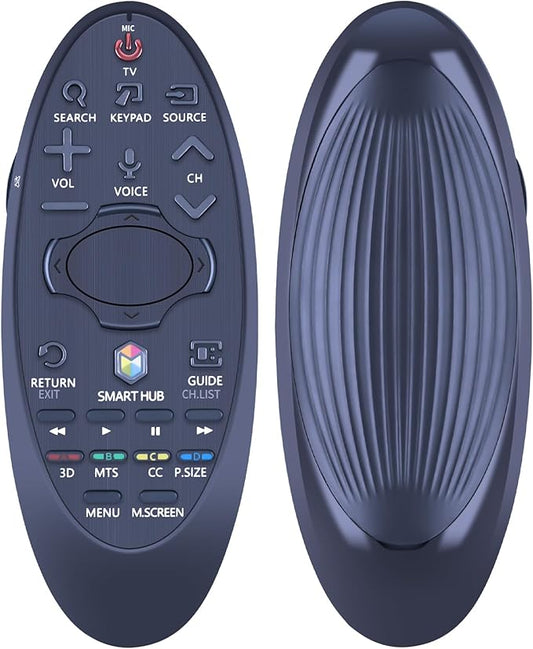
Samsung Part# BN59-01185K Smart Hub Remote Control - Genuine OEM
BN59-01185K
$126.95 $165.05

In stock 0 Products

Quick View

In stock 0 Products

Part

Samsung

$126.95 $165.05
Quick View

Frequently Asked Questions

Quick answers for your replacement part needs

Where can I find genuine replacement parts for my appliance?

Finding genuine replacement parts for your appliances has never been easier! We offer authentic parts for over 250 brands, including LG, Samsung, Whirlpool, Kenmore, Dyson, Bosch, and Liebherr. Simply enter your appliance's model number on our website, and explore our extensive selection of compatible parts designed to restore your appliance's peak performance and reliability.

What type of appliance parts and accessories are available for purchase?

Are your replacement parts compatible with all models?

What if I can’t find the appliance part I need?

How can I track my order for appliance parts online?

How long will it take to receive my replacement parts order?

Can I return appliance parts if they are not compatible with my model?

How can I update my shipping address after placing an order?

How can I get in touch with customer support?

Couldn’t find the answer to your question?

Your satisfaction matters. Let us know how we can assist with your repair journey.

Your Cart ( 0 items)

You currently have 0 items in your Cart

Return to shop
Menu

Compatible Models