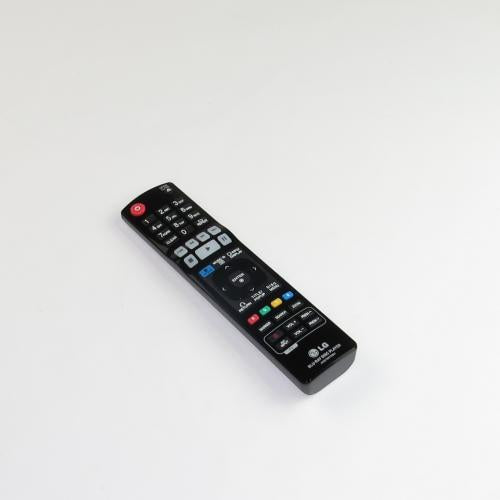
Blu-ray Disc & DVD Players

Blu-ray Disc & DVD Players Parts

Blu-Ray Disc and DVD players use a combination of optical, mechanical, and electronic parts to read a disc and send video and sound to a TV or receiver. The optical pickup reads the disc, the spindle motor spins it, the loading mechanism moves the tray, the main board processes data, and the power board supplies the needed voltages. When one of these parts fails, the player may show disc errors, refuse to open, freeze during playback, lose HDMI output, or stop powering on.

GenuineReplacementParts.com helps shoppers look for Blu-Ray and DVD player parts by brand, model number, and part type. Exact fit matters because laser pickup assemblies, tray doors, power boards, remotes, and main boards are often built for a specific chassis. A loading belt may look ordinary, but if it is the wrong size the tray can slip or bind. A laser assembly may fit the sled but use a different connector or calibration. A remote may power on the player but lack model-specific buttons.

The optical pickup is sometimes described as the laser lens. It reads tiny data tracks on the disc without touching the surface. If the player says no disc, skips on clean discs, or freezes at the same point on several discs, the optical pickup, spindle motor, sled movement, or main board may be involved. A dirty lens can cause reading trouble, but cleaning should be gentle. Harsh solvents, heavy pressure, or repeated cleaning can damage delicate parts.

The loading mechanism is the set of gears, rails, belt, and motor that moves the disc tray in and out. If the tray will not open, opens halfway, closes immediately, or makes a clicking sound, the belt may be stretched or a gear may be out of position. Some players have slot-loading mechanisms instead of trays, and those use different rollers and sensors. The correct repair depends on the mechanism type and model number.

Customers sometimes ask whether DVD player parts are interchangeable with Blu-Ray player parts. Some external accessories, such as certain power cords or remotes within a brand family, may overlap, but internal laser pickups, trays, boards, and firmware-controlled parts are usually model-specific. Blu-Ray players use different optical requirements than DVD-only players, and 4K players can be even more specific. Match the exact model and old part number whenever possible.

Disc Player Symptoms and Likely Parts

Symptom

Likely part

What to confirm

No disc or disc error

Optical pickup, spindle motor, sled assembly

Disc cleanliness, laser part number, connector style

Tray will not open

Loading belt, tray motor, gears, tray rails

Belt size, mechanism type, gear alignment

Player powers off or will not start

Power supply board, AC cord, main board

Standby light, fuse condition, voltage version

No HDMI output

HDMI port, main board, cable, TV input

Alternate cable/input before replacing board

Remote does not work

Remote control, IR receiver, front panel board

Batteries, remote code, player model

Playback freezes or skips

Laser pickup, spindle motor, dirty disc, main board

Try multiple known-good discs before ordering

Key Parts and Functions

Part

Function

Fit detail

Optical pickup

Reads data from Blu-Ray, DVD, or CD media

Laser assembly number and supported disc type

Spindle motor

Rotates the disc at controlled speeds

Motor size, connector, and mechanism position

Loading belt

Transfers motor force to tray movement

Correct belt path, size, and tension

Main PCB

Processes disc data and sends audio/video output

Board number, firmware, HDMI layout, connectors

Power board

Converts wall power to internal voltages

Voltage version, screw points, connector count

If a player sends audio and video through a home theater system, test the connection through AV receiver and amplifier parts as well. A good player can appear broken if the receiver input, HDMI board, or speaker path has failed.

Safety guidance starts with power. Unplug the player before opening the case. Avoid touching power supply areas, and do not stare into or power an exposed laser mechanism. Small plastic gears and ribbon cables are fragile, so take photos before disassembly and do not force the tray. If the unit smells burnt, has liquid damage, or repeatedly blows a fuse, have it inspected before ordering internal parts.

Some households use both disc players and cable or IPTV boxes through the same TV input path. If only broadcast or streaming channels fail while discs still play, check digital set top box parts instead of replacing disc player components.

Before ordering, find the full model number on the back or bottom label. If replacing an internal mechanism, compare the part number printed on the laser, board, motor, or tray assembly. For remotes, compare the original remote code or model number if available. For tray doors and front panels, check color, shape, and clip location. A part that fits one model year may not fit the next.

It is also useful to separate disc-specific problems from player-wide problems. If only one disc fails, inspect that disc for scratches, dirt, or unsupported region/format. If every disc type fails, the laser, spindle, or main board becomes more likely. If discs play but streaming apps or menus freeze, the issue may be software, network setup, or main board memory rather than the optical mechanism.

If the goal is to preserve old discs or record playback from a video source, the output chain may include digital audio/video recorder parts. In that case, confirm whether the playback player, cable, or recorder input is causing the problem.

GenuineReplacementParts.com helps customers shop disc-player parts with model-specific care. Use the symptom to narrow the likely part, then confirm part numbers and connector details before checkout. With the right laser pickup, belt, motor, board, remote, or panel, a Blu-Ray or DVD player can often return to reliable movie playback without replacing the entire entertainment setup.

For combination units, confirm the exact product type before ordering. A Blu-Ray player, DVD recorder, home-theater-in-a-box console, and media player can share a brand name while using very different internal assemblies. If the device records as well as plays, storage and tuner parts may be involved in addition to the disc mechanism.


Search result

Show filters
1 - 40 out of 12 results found in 0.003s
Sorted by

Blu-Ray Disc and DVD players use a combination of optical, mechanical, and electronic parts to read a disc and send video and sound to a TV or receiver. The optical pickup reads the disc, the spindle motor spins it, the loading mechanism moves the tray, the main board processes data, and the power board supplies the needed voltages. When one of these parts fails, the player may show disc errors, refuse to open, freeze during playback, lose HDMI output, or stop powering on.

GenuineReplacementParts.com helps shoppers look for Blu-Ray and DVD player parts by brand, model number, and part type. Exact fit matters because laser pickup assemblies, tray doors, power boards, remotes, and main boards are often built for a specific chassis. A loading belt may look ordinary, but if it is the wrong size the tray can slip or bind. A laser assembly may fit the sled but use a different connector or calibration. A remote may power on the player but lack model-specific buttons.

The optical pickup is sometimes described as the laser lens. It reads tiny data tracks on the disc without touching the surface. If the player says no disc, skips on clean discs, or freezes at the same point on several discs, the optical pickup, spindle motor, sled movement, or main board may be involved. A dirty lens can cause reading trouble, but cleaning should be gentle. Harsh solvents, heavy pressure, or repeated cleaning can damage delicate parts.

The loading mechanism is the set of gears, rails, belt, and motor that moves the disc tray in and out. If the tray will not open, opens halfway, closes immediately, or makes a clicking sound, the belt may be stretched or a gear may be out of position. Some players have slot-loading mechanisms instead of trays, and those use different rollers and sensors. The correct repair depends on the mechanism type and model number.

Customers sometimes ask whether DVD player parts are interchangeable with Blu-Ray player parts. Some external accessories, such as certain power cords or remotes within a brand family, may overlap, but internal laser pickups, trays, boards, and firmware-controlled parts are usually model-specific. Blu-Ray players use different optical requirements than DVD-only players, and 4K players can be even more specific. Match the exact model and old part number whenever possible.

Disc Player Symptoms and Likely Parts

Symptom

Likely part

What to confirm

No disc or disc error

Optical pickup, spindle motor, sled assembly

Disc cleanliness, laser part number, connector style

Tray will not open

Loading belt, tray motor, gears, tray rails

Belt size, mechanism type, gear alignment

Player powers off or will not start

Power supply board, AC cord, main board

Standby light, fuse condition, voltage version

No HDMI output

HDMI port, main board, cable, TV input

Alternate cable/input before replacing board

Remote does not work

Remote control, IR receiver, front panel board

Batteries, remote code, player model

Playback freezes or skips

Laser pickup, spindle motor, dirty disc, main board

Try multiple known-good discs before ordering

Key Parts and Functions

Part

Function

Fit detail

Optical pickup

Reads data from Blu-Ray, DVD, or CD media

Laser assembly number and supported disc type

Spindle motor

Rotates the disc at controlled speeds

Motor size, connector, and mechanism position

Loading belt

Transfers motor force to tray movement

Correct belt path, size, and tension

Main PCB

Processes disc data and sends audio/video output

Board number, firmware, HDMI layout, connectors

Power board

Converts wall power to internal voltages

Voltage version, screw points, connector count

If a player sends audio and video through a home theater system, test the connection through AV receiver and amplifier parts as well. A good player can appear broken if the receiver input, HDMI board, or speaker path has failed.

Safety guidance starts with power. Unplug the player before opening the case. Avoid touching power supply areas, and do not stare into or power an exposed laser mechanism. Small plastic gears and ribbon cables are fragile, so take photos before disassembly and do not force the tray. If the unit smells burnt, has liquid damage, or repeatedly blows a fuse, have it inspected before ordering internal parts.

Some households use both disc players and cable or IPTV boxes through the same TV input path. If only broadcast or streaming channels fail while discs still play, check digital set top box parts instead of replacing disc player components.

Before ordering, find the full model number on the back or bottom label. If replacing an internal mechanism, compare the part number printed on the laser, board, motor, or tray assembly. For remotes, compare the original remote code or model number if available. For tray doors and front panels, check color, shape, and clip location. A part that fits one model year may not fit the next.

It is also useful to separate disc-specific problems from player-wide problems. If only one disc fails, inspect that disc for scratches, dirt, or unsupported region/format. If every disc type fails, the laser, spindle, or main board becomes more likely. If discs play but streaming apps or menus freeze, the issue may be software, network setup, or main board memory rather than the optical mechanism.

If the goal is to preserve old discs or record playback from a video source, the output chain may include digital audio/video recorder parts. In that case, confirm whether the playback player, cable, or recorder input is causing the problem.

GenuineReplacementParts.com helps customers shop disc-player parts with model-specific care. Use the symptom to narrow the likely part, then confirm part numbers and connector details before checkout. With the right laser pickup, belt, motor, board, remote, or panel, a Blu-Ray or DVD player can often return to reliable movie playback without replacing the entire entertainment setup.

For combination units, confirm the exact product type before ordering. A Blu-Ray player, DVD recorder, home-theater-in-a-box console, and media player can share a brand name while using very different internal assemblies. If the device records as well as plays, storage and tuner parts may be involved in addition to the disc mechanism.


1778 products

Part

Panasonic Remote Control N2QAYA000217
N2QAYA000217
$18.45 $23.99

In stock 1 Products

Quick View

In stock 1 Products

Part

Panasonic

$18.45 $23.99
Quick View

Part

LG Remote Control AKB75135401
AKB75135401
$9.95 $16.95

In stock 21 Products

Quick View

In stock 21 Products

Part

LG

$9.95 $16.95
Quick View

Part

Panasonic Part# TXP0183 Drive Unit - Genuine OEM
TXP0183
$217.45 $282.69

In stock 13 Products

Quick View

In stock 13 Products

Part

Panasonic

$217.45 $282.69
Quick View

Part

TNPA6858
$61.45 $79.90

In stock 0 Products

Quick View

In stock 0 Products

Part

Panasonic

$61.45 $79.90
Quick View

Part

Panasonic Remote Control N2QAYA000175
N2QAYA000175
$138.85 $180.51

In stock 0 Products

Quick View

In stock 0 Products

Part

Panasonic

$138.85 $180.51
Quick View

Part

Samsung Remote Control - AK59-00149A
AK59-00149A
$17.82 $485.06

In stock 0 Products

Quick View

In stock 0 Products

NLA

Samsung

$17.82 $485.06
Quick View

Part

LG Remote Controller Assembly - AKB72975301
AKB72975301
$11.86 $15.42

In stock 0 Products

Quick View

In stock 0 Products

NLA

LG

$11.86 $15.42
Quick View

Part

LG Part# AKB73735801 Remote Control (OEM)
AKB73735801
$12.95 $16.84

In stock 0 Products

Quick View

In stock 0 Products

NLA

LG

$12.95 $16.84
Quick View

Part

L6FAYYYG0006
$30.95

In stock 1 Products

Quick View

In stock 1 Products

Part

Panasonic

$30.95
Quick View

Part

Panasonic Part# RDV0033-4 Rubber Belt - Genuine OEM
RDV0033-4
$15.85 $20.61

In stock 0 Products

Quick View

In stock 0 Products

Part

Panasonic

$15.85 $20.61
Quick View

Part

Samsung Disk Player Remote Control AK59-00167A
AK59-00167A
$31.27 $40.65

In stock 194 Products

Quick View

In stock 194 Products

NLA

Samsung

$31.27 $40.65
Quick View

Part

LG Part# EAD60816752 Power Cord - Genuine OEM
EAD60816752
$14.32 $23.99

In stock 0 Products

Quick View

In stock 0 Products

Part

LG

$14.32 $23.99
Quick View

Part

Samsung Remote Control AK59-00179A
AK59-00179A
$66.95 $73.95

In stock 9 Products

Quick View

In stock 9 Products

Part

Samsung

$66.95 $73.95
Quick View

Part

0CC100BK41A
$6.95 $9.04

In stock 0 Products

Quick View

In stock 0 Products

NLA

LG

$6.95 $9.04
Quick View

Part

0CC105BC5DA
$6.95 $9.04

In stock 0 Products

Quick View

In stock 0 Products

NLA

LG

$6.95 $9.04
Quick View

Part

0CC823BDGDA
$6.95 $9.05

In stock 0 Products

Quick View

In stock 0 Products

NLA

LG

$6.95 $9.05
Quick View

Part

0CE1074D638
$5.95 $7.74

In stock 0 Products

Quick View

In stock 0 Products

Part

LG

$5.95 $7.74
Quick View

Part

0CE4763F638
$5.95 $7.74

In stock 0 Products

Quick View

In stock 0 Products

Part

LG

$5.95 $7.74
Quick View

Part

0CG1020U630
$5.95 $12.94

In stock 0 Products

Quick View

In stock 0 Products

NLA

LG

$5.95 $12.94
Quick View

Part

0CK475CCG7A
$6.95 $9.05

In stock 0 Products

Quick View

In stock 0 Products

NLA

LG

$6.95 $9.05
Quick View

Frequently Asked Questions

Quick answers for your replacement part needs

Are your Blu-ray Disc & DVD Players parts compatible with all models?

Our Blu-ray Disc & DVD Players parts are designed to fit a wide range of models. Simply enter your model number before ordering, or reach out to us—we’re happy to help you find the right part.

Do you offer support with Blu-ray Disc & DVD Players replacement parts?

Yes, all Blu-ray Disc & DVD Players replacement parts include basic installation tips. If you need more help, our support team is always ready to assist.

Where can I buy Blu-ray Disc & DVD Players parts online in the United States?

You can buy Blu-ray Disc & DVD Players parts online from Genuine Replacement Parts in the United States. Just use your model number to find compatible parts easily.

Are Blu-ray Disc & DVD Players spare parts sold as new?

Yes, all Blu-ray Disc & DVD Players spare parts available through our platform are brand new and sourced from trusted suppliers to ensure quality.

Can I return Blu-ray Disc & DVD Players spares if they don’t fit?

Absolutely. You can return any unused Blu-ray Disc & DVD Players spares within 60 days of delivery. Please review our Return Policy for full details.

Can I track my Blu-ray Disc & DVD Players parts order?

Yes, once your Blu-ray Disc & DVD Players parts order ships, you’ll receive tracking information by email. Shipping time may vary depending on the warehouse.

Do Blu-ray Disc & DVD Players accessories come with a warranty?

Most Blu-ray Disc & DVD Players accessories and parts come with a limited manufacturer’s warranty. Visit our Guarantee page for more information.

What’s the return window for Blu-ray Disc & DVD Players spare parts?

You have 60 days from delivery to return any unused Blu-ray Disc & DVD Players spare parts. Please see our Returns page for instructions.

What if I don't know my Blu-ray Disc & DVD Player’s model number?

That’s okay! Contact us and we’ll help you locate it. You’ll usually find the model number on the back or underside of your device.

Can I update the shipping address after placing an order for Blu-ray Disc & DVD Players parts?

If your order has already been processed or shipped, a $22.00 nonrefundable address correction fee will apply. This fee must be paid before rerouting. Please visit our Shipping Policies page for more info.

Couldn’t find the answer to your question?

Your satisfaction matters. Let us know how we can assist with your repair journey.

Your Cart ( 0 items)

You currently have 0 items in your Cart

Return to shop
Menu

Compatible Models