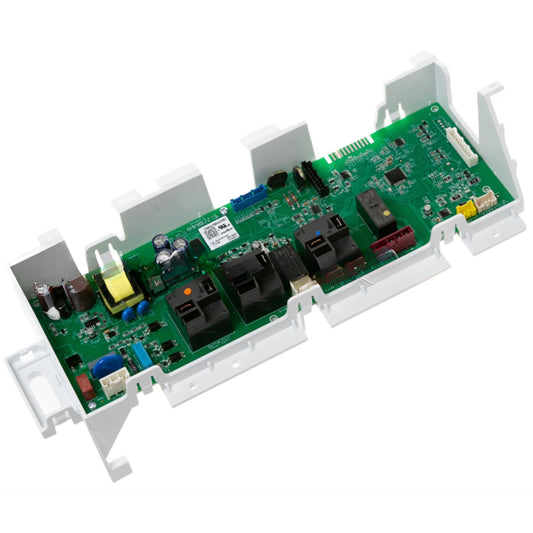
A GE dryer control board interprets switch and sensor inputs, then commands the motor, heater or gas controls, display, relays, and cycle timing. Some dryers use one electronic control, while others separate the main machine board from the user-interface board behind the console. Replacing the wrong board can leave the original symptom unchanged and may introduce a configuration problem.
Before blaming electronics, confirm that the dryer has the correct supply, the door closes tightly, the cycle is selected, and the start control is being operated normally. Electric dryers often use two supply legs; a dryer may tumble without heat when one leg is missing. A scorched door switch, burned terminal block, open safety device, loose harness, failed motor, or sensor fault can mimic a board failure.
The GE dryer control board assembly WE04M10004 is a mounted control assembly for specified designs. Compare the complete number, connector keys, mounting points, heat sinks, relay layout, and any required transfer pieces before disconnecting the old board.
Interface layouts require the same care. The GE dryer user interface WE22X32259 has a specific display window, button map, connector position, and software assignment that should be checked against the original interface.
Quick inspection sequence
- Record the exact symptom: completely dead, display active but no start, intermittent resets, wrong cycle response, no heat command, or cycle that will not end.
- Verify supply at the receptacle and terminal block using safe procedures. Look for loose, burned, or discolored cord and terminal connections.
- Inspect the door switch, start switch, thermal protections, motor circuit, and harness connectors before condemning the board.
- Photograph every connector and note locking tabs. Look for moisture, corrosion, overheated pins, cracked solder joints, or a relay area with visible heat damage.
- Determine whether the failed function originates at the user interface or the main control by checking whether button inputs, display communication, and commanded outputs are present.
Match the correct GE dryer control board part
- Use the full board part number, including any suffix, and compare supersession information only when it specifically lists the original number.
- Match connector keying, pin count, board outline, mounting posts, protective covers, included harnesses, display orientation, and software configuration requirements.
- Keep the old board until the dryer passes every function test. Some replacement programs require the original board to be returned as a core.
- Follow any personality or configuration procedure supplied with the replacement. A physically installed board may not operate correctly until configured for the appliance design.
Common problems and repair checks
Why is the GE dryer completely dead with no display or response?
Start with the wall supply, plug, circuit protection, terminal block, and incoming harness. A dead console does not prove the main board is faulty because an open connection or missing low-voltage supply can remove power from the interface. Inspect for burned terminals before touching electronics. If correct input power reaches the mounted control and its required outputs are absent, compare the original assembly with GE dryer control board assembly WE04M10004. Do not order from board color or connector count alone; confirm every printed identifier and the appliance-specific configuration.
Why does the GE dryer display light up but the cycle will not start?
An illuminated display confirms only part of the control system is powered. Verify door-switch input, start-button response, control lock, cycle selection, motor path, and safety devices. If the interface registers inputs but the main control does not command the motor relay, the GE dryer electronic control board WE04X23220 may be the matched control for its listed designs. If inputs never register, focus on the interface, keypad, connector, or harness instead. This distinction prevents replacing a costly main board for a broken plastic button or open switch.
Why does the GE dryer control panel reboot or beep by itself?
Random resets can result from an unstable supply, overheated terminal connection, loose board connector, moisture, failing low-voltage supply, or user-interface fault. Inspect the power cord and terminal block for discoloration, then reseat only de-energized connectors while checking pin tension. If the main supply remains stable and the user control board is losing communication or resetting internally, the GE dryer user control board WE04X25559 should be considered only after its exact part number and connector layout are confirmed. Replace damaged harness terminals separately.
Why do some GE dryer buttons work while others do not?
A group of dead buttons usually points toward the user interface, button tree, membrane, or connector rather than the high-current machine control. Inspect for a stuck plastic actuator, cracked panel post, contamination, and a partially seated ribbon or keyed plug. The GE dryer user interface board WE22X28668 and interface WE22X32259 represent different designs. Use the one assigned to the dryer, because display window, button map, software, and connector position can differ even when the boards look similar.
Why does the GE dryer run but ignore temperature or cycle selections?
First verify that the selected cycle permits the requested setting and that sensors, thermostats, heater controls, and airflow are functioning. A control cannot create heat if the supply leg, heating element, gas ignition system, or safety circuit is open. If the interface sends the correct selection but the board output remains incorrect after load checks, compare the original board with the GE dryer control board WE22X28761. Do not interpret one abnormal output as proof until the controlled component and its wiring have been tested.
Symptom and decision guide
|
Observed symptom
|
Check before ordering
|
Repair direction
|
|
No display or response
|
Supply, terminal block, low-voltage feed, harness
|
Confirm board input before replacement
|
|
Display works but no start
|
Door switch, start input, motor path, safety devices
|
Separate input failure from relay output
|
|
Some buttons are dead
|
Actuators, interface board, connector, panel damage
|
Diagnose the user interface first
|
|
Runs with wrong heat or timing
|
Sensors, airflow, heater/gas circuit, board output
|
Test the controlled load and command
|
Related GE dryer part categories
When a button, rotary selector, door switch, or lamp-related input is suspect, inspect the GE dryer switch and light bulb collection. A failed input can make a healthy board appear unresponsive.
If board power or communication changes when a harness is moved, review the GE dryer wire harness collection. Burned pins, loose terminals, and broken conductors must be repaired before installing electronics.
When the complaint is incorrect heat or cycle termination, compare readings from the GE dryer thermostat and sensor collection. A board should not be replaced for a sensor value that is outside specification.
Installation and safety
- Disconnect power and wait for stored charge to dissipate. Photograph the board, wire routing, shields, and every connector before removal.
- Use proper electrostatic-discharge precautions, release locking tabs without pulling wires, and transfer only the covers or supports specified in the instructions.
- Mount the board without flexing it, reconnect each keyed plug fully, restore protective barriers, and complete any required personality or configuration procedure.
- Test the display, every button, door input, motor start, heat command, cycle progression, and shutdown. Recheck the terminal block for abnormal heat after operation.
Before-ordering checklist
|
Verify
|
What must match
|
|
Board role
|
Main machine control, mounted assembly, user control, display board, or user interface
|
|
Electrical match
|
Full part number, connectors, pin count, harness keys, relays, and supply requirements
|
|
Mechanical match
|
Outline, mounting posts, covers, display position, buttons, and transferred parts
|
|
Commissioning
|
Configuration instructions, core return, function test, and corrected root cause
|