Find replacement parts by matching the exact device, vehicle, or computer model number, checking the old part number, and comparing fit details before ordering.
All-in-one desktop parts are replacement components for computers built directly into a monitor-style housing. Instead of a separate tower, an all-in-one desktop keeps the display, speakers, webcam, motherboard, cooling system, storage, memory, power board, stand, and internal cables inside one compact unit. This saves desk space, but it also means many replacement parts are custom to the exact model.
The right part depends on the full model number, serial number, configuration, screen size, and sometimes the production revision. A stand from one all-in-one desktop may not fit another. A display panel may have the same diagonal size but a different connector, mounting bracket, resolution, or touch layer. A cooling fan may look close but use the wrong cable or airflow design. Always match the replacement part to the exact system before ordering.
So, what are the parts of an all-in-one computer? A practical replacement list includes the LCD panel, touchscreen digitizer when equipped, motherboard, power supply or adapter, internal power board, cooling fan, heatsink, RAM, SSD, speaker set, webcam, microphone board, Wi-Fi card, stand, hinge, rear cover, front bezel, button board, internal cables, and screws. Not every part is upgradeable, but many common failures can be repaired with the correct model-specific component.
All-in-one desktop repairs are different from portable computer repairs. A convertible laptop may also have a touchscreen, but it uses smaller batteries, hinges, and keyboard assemblies. If the device folds into tablet mode or detaches from a keyboard, use 2-in-1 PC parts for the right category and compatibility process.
The display is often the most important and most expensive part of an all-in-one desktop. A cracked screen, flickering image, dim backlight, dead pixels, or failed touch response may require a display panel, digitizer, cable, or complete display assembly. Before ordering, confirm screen size, resolution, touch support, connector location, and panel part number. Touch and non-touch models are usually not interchangeable unless the manufacturer specifically supports the swap.
All-In-One Desktop Parts and What They Do
|
Part
|
Function
|
Fit Check
|
|
Display panel or touch assembly
|
Shows the image and may provide touch input
|
Screen size, resolution, connector, touch support
|
|
Cooling fan and heatsink
|
Moves heat away from processor and board
|
Fan connector, screw pattern, airflow design
|
|
Power adapter or power board
|
Supplies regulated power to the system
|
Voltage, wattage, connector, model support
|
|
Stand, hinge, rear cover
|
Supports and protects the computer body
|
Chassis size, color, mounting points
|
|
RAM or SSD
|
Handles memory and storage needs
|
Supported type, capacity, physical size
|
Can you upgrade parts in an all-in-one computer? Sometimes, but the answer depends heavily on the model. Many all-in-one desktops allow storage or memory replacement, especially if they have accessible service panels. Other parts, such as the CPU, graphics chip, motherboard, display assembly, and power board, are usually proprietary and must match the exact model. Treat upgrades and repairs differently: an SSD or RAM upgrade may improve performance, while a display, fan, board, or stand replacement is primarily a fit-critical repair.
Power issues can come from the external adapter, DC-in jack, internal power board, motherboard, or button board. If the desktop shows no power at all, check whether the power adapter light is on, whether the outlet works, and whether the power cable seats firmly. If the system turns on briefly and shuts down, the issue could involve overheating, power regulation, or a failing board. Do not force a higher-wattage or different-voltage adapter unless it is specified for the model.
Some customers repair multiple electronics in one space, including radio players, media devices, and desktop computers. If the issue is with reception, tuning, speaker output, or an antenna on a radio unit, compare FM/AM player parts rather than searching desktop parts. The words speaker, board, and antenna can appear in both categories, but the parts are not interchangeable.
Cooling parts are important because all-in-one desktops have limited internal airflow. A grinding noise may come from a failing fan. Random shutdowns can happen when dust blocks the heat sink or the fan no longer moves enough air. A replacement fan should match the connector, voltage, blade size, screw layout, and airflow direction. If the desktop has a discrete graphics model, it may use a different fan or heat sink than a basic configuration from the same series.
The question many shoppers ask is whether all-in-one desktops are a good idea. They can be a good choice when space saving, a clean desk setup, and simple everyday computing matter. From a parts perspective, the tradeoff is that all-in-one desktops are less flexible than tower PCs. They are easier to place on a desk, but harder to modify with standard desktop parts. That is why exact replacement matching is so important.
Navigation screens and all-in-one desktop displays can look similar in a product photo, but they belong to different repair categories. A vehicle navigation unit must match the vehicle system, trim, and connector layout. If your repair is for a dashboard GPS display, GPS antenna, map module, or vehicle harness, use navigation system parts rather than computer display parts.
Common Symptoms and Possible Replacement Areas
|
Symptom
|
Possible Part Area
|
What to Check First
|
|
No power
|
Adapter, DC jack, power board, motherboard
|
Outlet, adapter rating, power button response
|
|
Flickering or cracked display
|
LCD, digitizer, display cable
|
Panel part number and touch support
|
|
Loud fan or shutdowns
|
Cooling fan, heatsink, thermal material
|
Dust, fan movement, exact fan model
|
|
No camera or sound
|
Webcam, microphone board, speaker assembly, cables
|
Device settings and internal cable connection
|
|
Unstable stand
|
Stand, hinge, mounting screws, rear cover
|
Screw holes, stand type, chassis match
|
Storage and memory replacements are among the more manageable all-in-one desktop repairs. Some models use SO-DIMM memory, while others use soldered memory or limited access designs. Storage may be M.2 SSD, 2.5-inch SATA, or a manufacturer-specific bracket and cable arrangement. Before buying RAM or SSD parts, check the system manual or original part specifications. A physically compatible memory module still needs to match supported generation, speed, and capacity limits.
What are the seven components of a desktop computer? In a broad sense, people often mean the motherboard, processor, memory, storage, power supply, cooling system, and display or graphics output. In an all-in-one desktop, those components are packaged inside the monitor body, and many are custom-shaped. That means repairs often involve assemblies, brackets, and cables that do not appear in a standard tower PC.
Stands, hinges, rear covers, and bezels are also common replacement needs. A cracked stand can make the computer unstable. A broken hinge can prevent proper tilt adjustment. A damaged rear cover may expose ports or make the unit difficult to mount securely. Cosmetic parts should still be matched by model, color, size, and screw pattern. Do not assume one stand fits all units from the same brand.
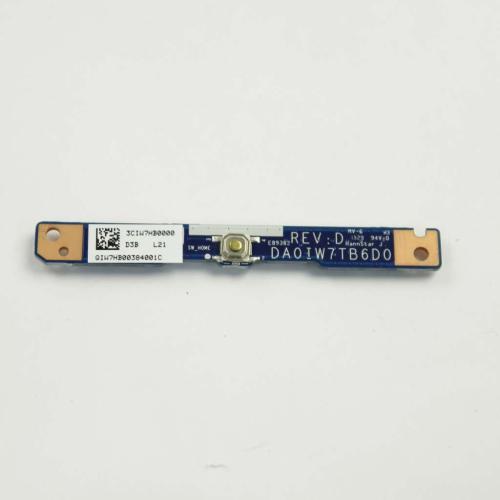
Small internal boards can also cause specific failures. A power button board may stop the computer from responding even when the adapter works. A webcam board may fail while the display stays normal. A speaker assembly may crackle after liquid exposure or age. These smaller parts are easy to overlook, but they still need exact connector and mounting-point checks before ordering.
GenuineReplacementParts helps customers look for all-in-one desktop replacement components by exact model details, symptom, and old part number. Before ordering, confirm whether the repair involves the display, power, cooling, memory, storage, stand, or internal cable. If the repair requires screen separation, power-board handling, or motherboard replacement, disconnect power and consider professional service.
Quick Ordering Checklist
- Confirm the exact product, vehicle, or computer model number before ordering.
- Compare the old part number, connector shape, mounting points, and size.
- Review symptoms so you replace the part that is actually causing the issue.
- Check whether the repair is a simple external replacement or an internal repair that needs a technician.
- Use GenuineReplacementParts to look for exact-fit replacement components for your device.